Pheromones
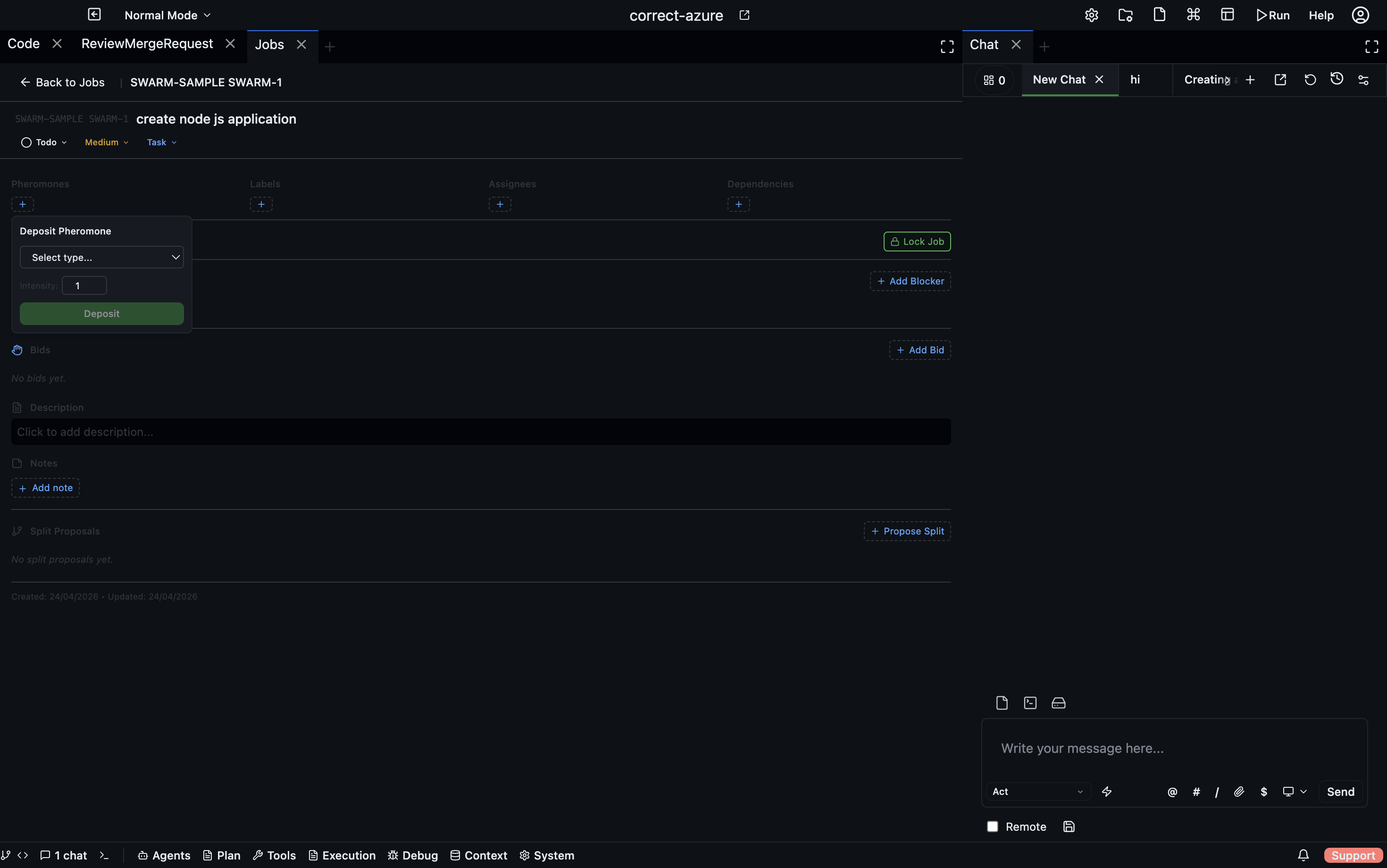
A pheromone is a typed signal that an agent or user deposits on a shared entity (a job, a review request, etc.) to influence what other agents do next. Any agent reading the entity sees the current pheromone load and reacts — there is no central scheduler.
Internally, pheromones are stored inline on the entity (e.g., Job.pheromones) and managed by a shared coordinationService on the server. All pheromone configuration is persisted under .codebolt/coordination/pheromoneTypes.json in the project.
Anatomy of a pheromone
Each deposit has:
| Field | Meaning |
|---|---|
type | One of the registered pheromone types (e.g., saturation, importance) |
intensity | A number from 0 to 10 — how strongly the depositor is signalling (default 1) |
depositedBy | Agent or user ID that deposited it |
depositedByName | Optional display name of the depositor |
depositedAt | ISO timestamp when it was deposited |
decayRate | Optional override of the type's default decay rate |
expiresAt | Optional hard expiration timestamp |
A single agent can hold one deposit per type per entity — depositing again of the same type from the same agent updates the existing deposit rather than stacking.
The lifecycle: deposit → decay → aggregate → action
A pheromone moves through four phases:
- Deposit — an agent writes a pheromone with an initial intensity
I₀. - Decay — the intensity fades over time by
I(t) = I₀ · e^(-λ·t)whereλis the decay rate. Stale signals self-clean. - Aggregate — multiple deposits of the same type sum:
I_total(j, t) = Σᵢ Iᵢ(j, t). Many weak signals can combine into a strong one. - Action — an agent reading the entity reacts to the aggregated, decayed intensity (typically against a threshold) and picks a next action.
A single agent can hold only one deposit per type per entity — depositing the same type again from the same agent updates the existing deposit rather than stacking. Aggregation is therefore across different depositors.
A pheromone with high decayRate is good for "I am actively doing this right now" signals: if the agent stops refreshing, the signal disappears on its own. A pheromone with decayRate = 0 is a persistent marker — use it when the signal must be removed explicitly.
Temporal layers
Grouping the default types by decay rate gives a practical lens — signals at different decay rates serve different coordination horizons:
| Layer | Decay rate | Persists for | Examples |
|---|---|---|---|
| Permanent | 0 | Until removed | request_split, importance, task_not_ready, files_blocked, reviewadded |
| Slow | 0.05 | Hours | saturation, available |
| Moderate | 0.1 | ~1 hour | takeup_interest |
| Fast | 0.2 | Minutes | workingonit |
Pick the layer that matches the meaning of your signal. "This is important" is persistent; "I'm on it right now" should fade fast and require the agent to refresh it if still working.
Default pheromone types
The server ships nine default types. They cover the common coordination scenarios and cannot be removed (but custom types can be added alongside them).
| Type | Meaning | Default decay | Good for |
|---|---|---|---|
request_split | This entity should be split into smaller parts | 0 | Signalling scope is too large |
importance | Priority/importance signal | 0 | Nudging the queue without editing priority |
saturation | Entity is being worked on or is saturated with agents | 0.05 (slow) | "Enough hands on this already — go elsewhere" |
takeup_interest | Interest in taking this up | 0.1 (moderate) | Soft bid before a formal bid |
task_not_ready | Entity has blocking dependencies | 0 | "Don't start this yet" |
available | Blockers are resolved, entity is available again | 0.05 (slow) | Counter-signal to task_not_ready |
files_blocked | Required files reserved by another agent via File Update Intent | 0 | Soft warning that a lock sits upstream |
workingonit | An agent is actively working on this | 0.2 (fast) | Live "in progress" signal; auto-fades if not refreshed |
reviewadded | A review was added (may trigger deliberation) | 0 | Persistent review marker |
saturation is the signal to reach for when an entity is "full" — enough agents are already on it and new arrivals should pick something else. It decays slowly so it lingers past the moment of deposit but still fades if the work wraps up.
Depositing, viewing, and removing
From the UI
Open the entity (a job in the Jobs panel, a request in the Review/Merge panel). The right-hand detail view shows a Pheromones section with:
- A colour-coded badge per active type, sized by aggregated intensity
- The list of individual deposits (who, when, at what intensity)
- A + Deposit button to add a new pheromone with type and intensity 0–10
- A × control to remove your own deposit
From the HTTP API
Each coordinated entity exposes the same CRUD surface. For jobs:
GET    /jobs/:id/pheromones                 # raw list
GET    /jobs/:id/pheromones/aggregated      # grouped by type with totals
POST   /jobs/:id/pheromones                 # { type, intensity?, depositedBy?, decayRate? }
DELETE /jobs/:id/pheromones/:type           # remove all of a type, or yours only
Similar routes exist under /review-merge-requests/:id/pheromones.
From agent code
The SDKs wrap the same calls — see jobs.depositPheromone, jobs.getPheromonesAggregated, and the similar surface on the review-merge socket.
Querying by pheromone
Need a list of entities matching a signal? The server exposes GET /jobs/pheromones/:type/jobs to list jobs that currently carry a given pheromone. Combine with the UI filter bar to build views like "all jobs tagged importance >= 5" or "everything with task_not_ready right now".
Registering a custom pheromone type
The default nine cover most flows. If you need a project-specific signal, register it:
POST /jobs/pheromone-types
{
  "name": "needs_security_review",
  "displayName": "Needs Security Review",
  "description": "Flag when security-sensitive files changed",
  "color": "#DC2626",
  "defaultDecayRate": 0
}
Custom types persist to .codebolt/coordination/pheromoneTypes.json and appear in the UI alongside the defaults. Default types cannot be removed; custom ones can be via DELETE /jobs/pheromone-types/:name.
The same POST /pheromone-types route is available on each coordinated entity's router, but pheromone types are shared across entities — a type registered via /jobs/pheromone-types is equally available on review-merge requests.
Good stigmergic signals
A few practical rules of thumb:
- Prefer decay. A signal that fades on its own is self-correcting; a signal with zero decay must be cleaned up.
- Keep intensity meaningful. The 0–10 range is only useful if agents treat
9differently from2. If every deposit is1, use the aggregation count instead. - Pair signals.
task_not_ready+availableare a paired signal; depositing one typically replaces the other. Design custom types in pairs when the signal has a natural on/off. - Let the decay rate match the meaning. "I'm working on this right now" should fade fast. "This is important" should not fade at all. Use the defaults as a guide.
Related
- Locks & Unlock Requests — hard exclusion when signals are not enough
- Jobs — the primary coordinated entity
- Stigmergy Swarm (concepts) — the full theory, decay/aggregation formulas, and scaling model