LLM Providers
How to configure which LLMs Codebolt uses. You can have as many providers configured simultaneously as you like; different agents or tabs can use different ones.
Supported providers
Remote (require API keys):
- OpenAI — GPT models
- Anthropic — Claude models
- Google — Gemini models
- Azure OpenAI — OpenAI models hosted in Azure
- AWS Bedrock — Anthropic, Meta, and others via AWS
- Groq — fast inference for open models
- Together, Fireworks, Replicate, OpenRouter — various third-party hosts
Local:
- Ollama — the easiest local runner
- llama.cpp — raw GGUF models
- LM Studio — GUI local runner
- vLLM, TGI — production-grade local serving
BYO:
- Custom HTTP endpoints — any OpenAI-compatible API
- Custom providers — see Build on Codebolt → Custom LLM Provider
See Local models for local setup.
Configuring a provider
- Desktop
- CLI
- Config file
- HTTP API
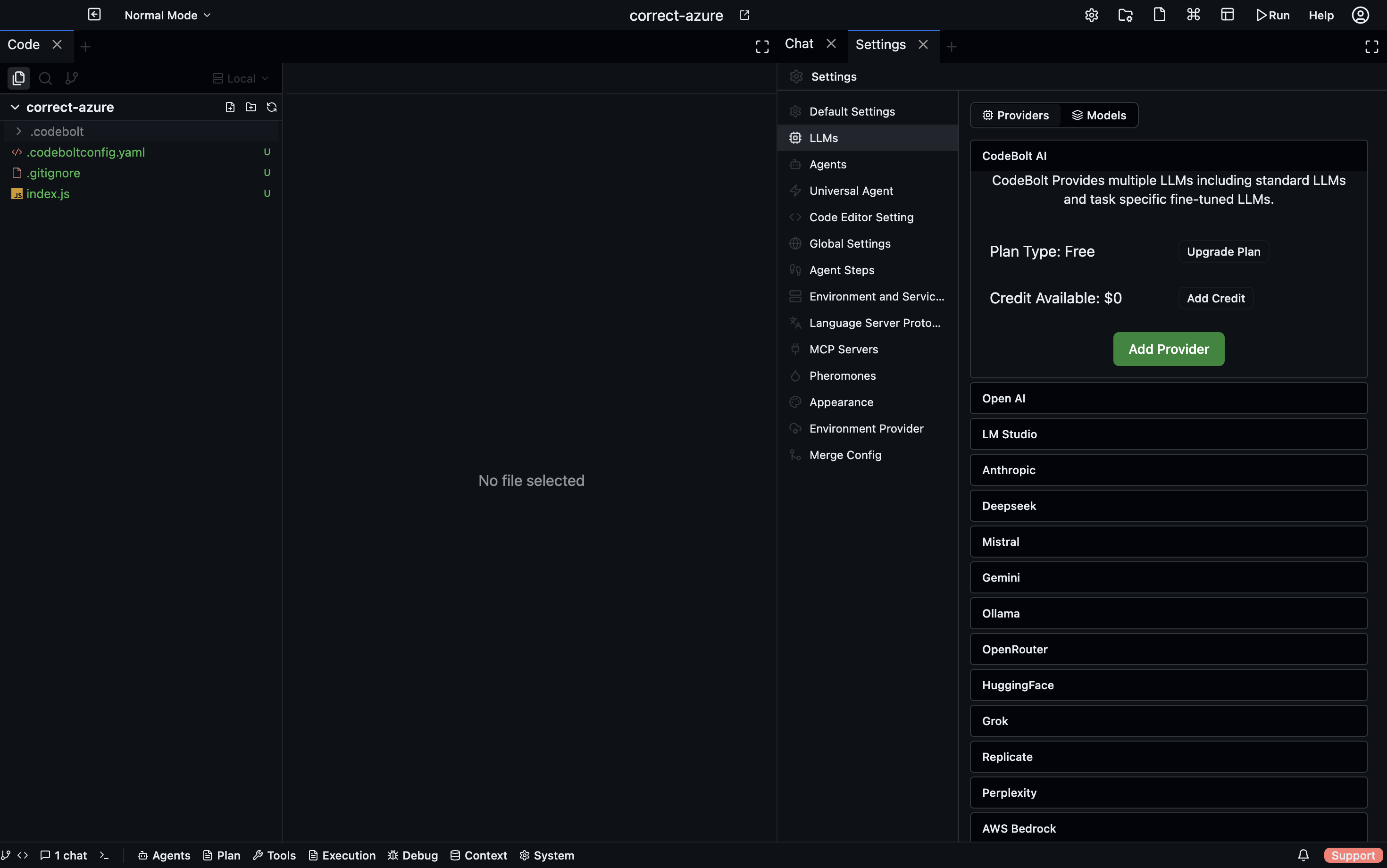
Settings → Providers → Add provider. Pick from the list, fill in the credential fields shown below for the provider, click Test, then Save.
codebolt provider add openai --key sk-...
codebolt provider add anthropic --key sk-ant-...
codebolt provider add azure-openai --key ... --endpoint https://my.openai.azure.com --deployment gpt-4-deployment
codebolt provider test openai
~/.codebolt/providers.yaml (or .codebolt/providers.yaml in a project):
providers:
  openai:
    type: openai
    api_key_env: OPENAI_API_KEY
  anthropic:
    type: anthropic
    api_key_env: ANTHROPIC_API_KEY
  azure:
    type: azure-openai
    endpoint: https://my.openai.azure.com
    deployment: gpt-4-deployment
    api_key_env: AZURE_OPENAI_KEY
Use _env suffixes to read secrets from environment variables instead of hard-coding.
POST /api/providers
{
  "type": "anthropic",
  "name": "anthropic",
  "credentials": { "api_key": "sk-ant-..." }
}

POST /api/providers/:name/test
Provider field reference
The fields each provider needs:
OpenAI
API key: sk-...
Organization (optional): org_...
Base URL (optional): https://api.openai.com/v1
Anthropic
API key: sk-ant-...
Base URL (optional): https://api.anthropic.com
Google
API key: your-google-key
Project ID (for Vertex): my-gcp-project
Location (for Vertex): us-central1
Azure OpenAI
API key: your-azure-key
Endpoint: https://<resource>.openai.azure.com
Deployment name: gpt-4-deployment
API version: 2024-08-01-preview
AWS Bedrock
Access key ID: AKIA...
Secret access key: ...
Region: us-east-1
(Or use IAM role / AWS profile if the server is on EC2.)
Custom HTTP (OpenAI-compatible)
Name: my-provider
Base URL: https://my-endpoint.example.com/v1
API key: any-string
Good for any service that mimics the OpenAI API — Groq, Together, Fireworks, OpenRouter, a local vLLM server.
Testing
Every provider has a Test button. Click it. Codebolt sends a one-token completion and shows the response. If the test fails, you get a specific error:
- 401 / 403 — bad key or wrong organization.
- 404 — wrong base URL or deployment name.
- 429 — rate limit or quota exceeded.
- Network error — can't reach the endpoint; check firewall.
- SSL error — certificate issue, usually with a self-hosted proxy.
Don't skip the test. A provider that "should work" might have a typo in the key that only fails when you're running a real agent.
Key storage
API keys are stored encrypted at rest in the Codebolt DB. Key encryption uses the server's master key, which itself is stored in the OS keychain (macOS Keychain, Windows Credential Manager, Linux Secret Service).
For headless / CI environments where no keychain exists, provide the master key via env var:
export CODEBOLT_MASTER_KEY=...
See Self-hosting → Security hardening for the full key management story.
Per-scope configuration
Like other settings, providers are layered:
- Project — provider specific to this project (rare; useful for "this customer project uses their own Azure deployment").
- Workspace — most common.
- User — your personal keys across all workspaces.
- Server — shared keys on self-hosted instances.
Use user-level keys for your personal development. Use workspace-level for client-specific work. Use server-level if you're self-hosting and want a shared team key (with usage tracking per user).
Rate limits and retries
Every provider has rate limits. Codebolt handles common cases automatically:
- Transient 429s → exponential backoff with jitter, up to N retries.
- Concurrent request caps → the LLM path has a per-provider semaphore.
- Hard quota errors → surfaced to the user immediately; no retry.
If you're hitting rate limits often:
- Lower the max concurrency in the provider's advanced settings.
- Use a cheaper / higher-quota tier.
- Add a second provider and let Codebolt fall back.
Fallback chains
You can configure a provider to fall back to another on failure:
Provider: openai-primary
  Fallback: anthropic-claude
    Fallback: ollama-local
If openai-primary returns an error (or exceeds a budget), the request retries against anthropic-claude. If that also fails, it tries ollama-local.
Fallbacks are useful for:
- Resilience — remote outages don't stop you from working.
- Cost — a cheap local fallback for tasks that don't need flagship quality.
- Rate limit relief — fall back when you hit quota, rather than stopping.
Be aware: different models give different results. Falling back mid-run can cause visible behaviour changes. Codebolt surfaces a fallback marker in the trace.
Usage tracking
Settings → Providers → Usage shows per-provider usage:
- Tokens consumed (input + output, per model).
- Estimated cost (based on your configured per-token rates).
- Request count.
- Failure rate.
- 30-day history.
For self-hosted team instances, usage is tracked per user — handy for chargeback or quota enforcement.
Usage numbers come from the event log (every LLM call is logged), so they're accurate to the last call. They may lag actual provider bills by a bit because provider invoicing rounds and batches differently.
Default provider
When a new tab or a new agent doesn't pick a provider explicitly, Codebolt uses the default set in:
- The agent's
default_model(mapped to a provider). - The workspace default.
- The user default.
Set your user default to the provider you use most; set workspace defaults when a specific project has different needs.
Removing a provider
Settings → Providers → Remove. This:
- Deletes the stored key.
- Marks any agent or tab that was using this provider.
- Does not delete historical usage data.
Agents bound to the removed provider fall back to their next-best option, or fail with "no provider" if none is available.