Memory Ingestion
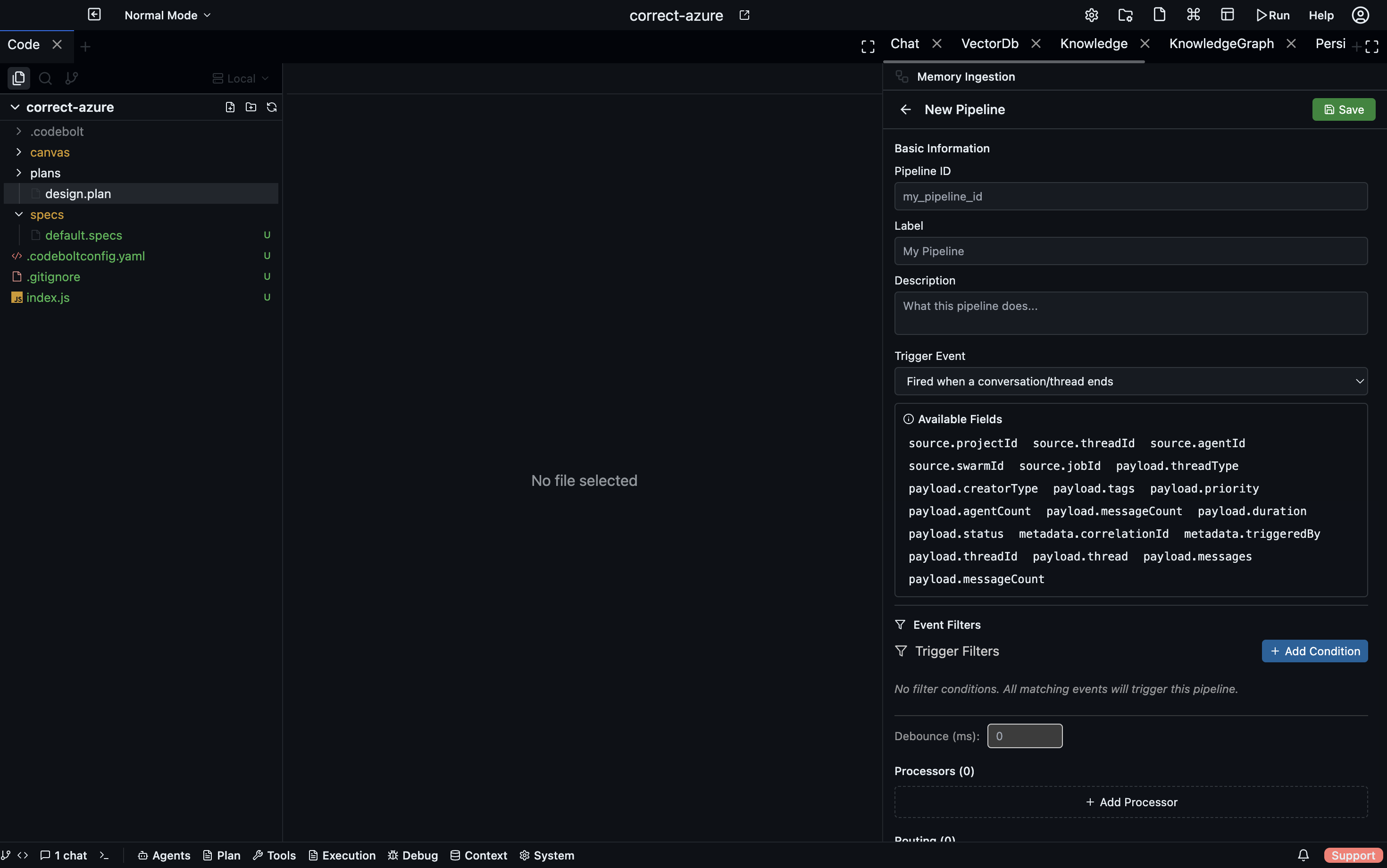
Memory Ingestion provides event-driven write-path pipelines that transform application data and route it into storage layers. Pipelines trigger on application events (conversation end, task completion, git commit, etc.) and execute a sequential processor chain followed by routing rules that write results to destinations.
Storage
Pipeline definitions are stored as individual JSON files:
{projectPath}/.codebolt/MemoryIngestion/{id}.json
Each file contains a complete IngestionPipeline definition.
Pipeline Definition Structure
id: string
label: string
description: string
version: string
status: 'active' | 'disabled' | 'draft'
trigger: IngestionTrigger
trigger_config: object       # filter conditions
processors: IngestionProcessor[]
routing: RoutingRule[]
Trigger Types
Codebolt supports eight trigger types that determine when a pipeline executes:
| Trigger | Fires when |
|---|---|
onConversationEnd | A chat thread completes |
onConversationStart | A chat thread opens |
onTaskStart | A task begins |
onTaskCompleted | A task finishes successfully |
onTaskFailure | A task fails |
onAction | A specific agent action occurs |
onError | An error occurs |
manual | Triggered only via API |
Event Bridge Architecture
The memoryIngestionEventBridge connects the Application Event Bus to pipelines. The flow works as follows:
- On pipeline activation --
subscribePipeline()registers with the Application Event Bus. - When event fires -- The bridge receives an
ApplicationEvent. - Data resolution --
eventDataResolverService.resolveEventData()enriches the event with domain data (fetches full job, thread, task details from services). - Conversion -- Resolved data is converted to
EnrichedIngestionEventDatawith a flattened payload. - Emission --
bridgeEvents.emit('enrichedEvent', { pipelineId, event })triggers pipeline execution.
Built-in Resolvers
| Resolver | Behavior |
|---|---|
| Job resolver | Fetches full job + pheromones |
| Conversation start/end resolvers | Fetches thread + messages |
| Message added resolver | Fetches specific message |
| Task resolver | Fetches task details |
| Passthrough resolver | For agent, swarm, file, git events (passes payload as-is) |
The 8 Processor Types
1. blob_store (Storage)
Stores raw data with a bucket/key reference.
- Returns:
{ ref: { bucket, key, timestamp, size } } - Params:
bucket,metadata
2. chunker (Transform)
Splits text into chunks with overlap. Handles strings, arrays of strings, and objects with text/content fields.
- Returns: Array of
{ text, index, metadata: { originalLength, chunkSize, overlap } } - Params:
chunk_size(default 400),overlap(default 50),separator
3. vector_embed (Transform)
Generates vector embeddings for chunks.
- Params:
model,batch_size
4. llm_extract (Extraction)
Calls an LLM to extract structured entities from input. Builds a prompt from a template plus input data, parses the JSON response, and handles markdown code blocks in the response.
- Returns: Extracted data with
_metadata: { model, promptTokens, completionTokens } - Params:
prompt_template,output_schema,model,temperature,max_tokens
5. llm_extract_kb (Extraction)
Extracts entities for the Knowledge Base with optional Knowledge Graph template integration. If kg_template_id is provided, the template schema is included in the prompt for structured extraction.
- Returns:
{ nodes[], edges[], _metadata } - Params:
prompt,output_format,kg_template_id
6. parser (Transform)
Parses structured data formats. Supports JSON with optional path extraction via jq-style paths.
- Params:
format(json/xml/yaml),path
7. normalizer (Transform)
Cleans and normalizes data. Operations include lowercasing strings, trimming whitespace, and recursively removing null/undefined values.
- Params:
lowercase,trim,remove_nulls
8. custom (Custom)
The custom processor is registered as a type but all three execution modes are currently stubbed out in the ingestion pipeline — they log a message and return an empty object. Custom steps do work in Persistent Memory retrieval pipelines (actionBlockPath and inlineCode via SideExecutionManager).
Planned execution modes:
inlineCode— JavaScript evaluated in a sandbox.actionBlockPath— Executed via SideExecutionManager.handler— Named registered handler function.
Routing Engine
After processors complete, routing rules direct outputs to storage destinations.
Routing Rule Structure
{
  from: string,          // processor output name
  foreach?: boolean,     // iterate over array items
  condition?: string,    // optional condition expression
  write_to: WriteDestination
}
Write Destinations
1. graph (Knowledge Graph)
Resolves an instance by name or ID. Handles both single records and arrays. For each item, creates a node via addMemoryRecord with kind, name, and attributes. If edges are present, creates edges via addEdge. Bulk operations are supported for arrays.
2. vector (Vector Database)
Resolves a collection by name or ID. Upserts a document with a URI generated from the event type and timestamp, text from the content/text field, and metadata from the data object.
3. kv (Key-Value Store)
Resolves an instance by name or ID (auto-creates via ensureInstance). Supports key_template with variable substitution. Stores the value via kvStoreDataService.set().
4. blob (Blob Storage)
Placeholder in the current implementation.
- Config:
bucket,path_template
5. log (Event Log)
Resolves an instance by name or ID (auto-creates via ensureInstance). Appends an event with event_type from the destination config. The payload is the routed data.
Pipeline Execution Flow
1. Load pipeline definition
2. Build IngestionEventData from input
3. For each processor (sequential):
   a. Resolve input (from event payload or previous output)
   b. Execute processor handler
   c. Store output in outputs map
   d. Emit 'processor-completed' event
4. Execute routing rules:
   a. For each rule: get data from outputs[rule.from]
   b. If foreach: iterate items, write each
   c. If condition: evaluate before writing
   d. Call writeToDestination()
5. Return PipelineExecutionResult with processor results,
   routing results, and timing
Validation
validatePipeline() performs the following checks:
- Required fields:
id,label,trigger - Processors: Valid type, has
idandoutput, type-specific parameter validation - Routing: Valid
fromreference, valid destination type, required destination fields
Returns { valid, errors[], warnings[] }.
Pipeline Lifecycle
| Operation | Behavior |
|---|---|
| Create | Validates, saves file, subscribes to event bus if active |
| Update | Re-subscribes if trigger changes, unsubscribes if deactivated |
| Delete | Unsubscribes from event bus, removes file |
| Activate / Disable | Changes status, manages event bus subscription |
| Duplicate | Deep copy with new ID and optional new label |
WebSocket Events
memoryIngestion:created/memoryIngestion:updated/memoryIngestion:deletedmemoryIngestion:execution-startedmemoryIngestion:execution-completedmemoryIngestion:processor-completed
REST API
Pipeline CRUD
| Method | Endpoint |
|---|---|
GET | /memory-ingestion/pipelines |
POST | /memory-ingestion/pipelines |
GET | /memory-ingestion/pipelines/:id |
PUT | /memory-ingestion/pipelines/:id |
DELETE | /memory-ingestion/pipelines/:id |
Pipeline Actions
| Method | Endpoint |
|---|---|
POST | /memory-ingestion/pipelines/:id/execute |
POST | /memory-ingestion/pipelines/:id/activate |
POST | /memory-ingestion/pipelines/:id/disable |
POST | /memory-ingestion/pipelines/:id/duplicate |
Metadata and Validation
| Method | Endpoint |
|---|---|
POST | /memory-ingestion/validate |
GET | /memory-ingestion/processors |
GET | /memory-ingestion/events |
GET | /memory-ingestion/events/schemas |
GET | /memory-ingestion/events/schemas/:eventType |