Optimization
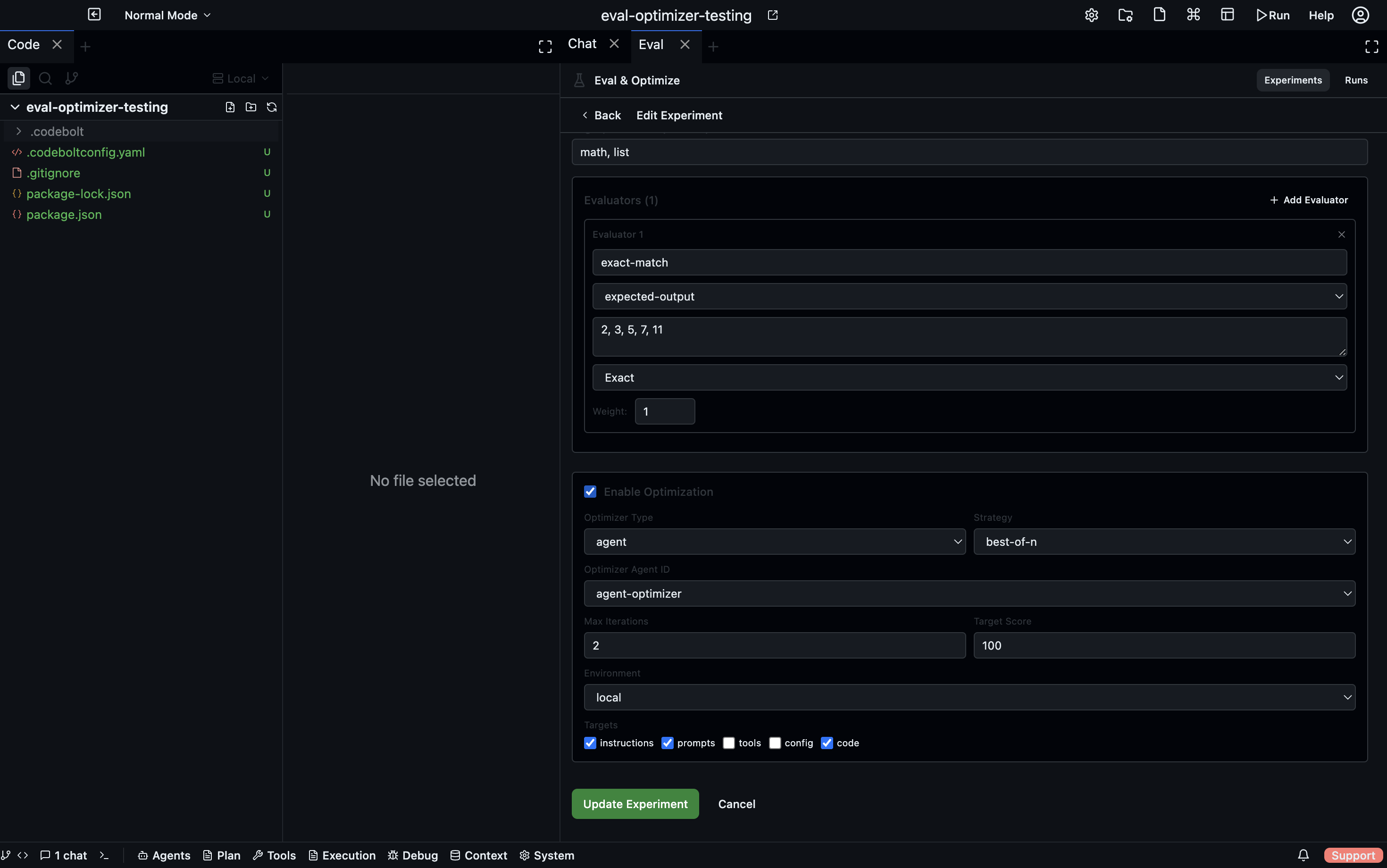
When optimization is enabled on a task, Codebolt runs an automatic improvement loop after the baseline eval. An optimizer agent reads the subject's code, prompts, or config and makes one targeted modification per iteration. The modified subject is re-evaluated, and the change is kept or discarded based on the chosen strategy. This repeats until the target score is reached or the iteration limit is hit.
How the loop works
Baseline eval
    │  produces initial score
    ▼
Iteration 1
  ├─ Modifying  → optimizer agent changes subject
  ├─ Evaluating → re-run task on modified subject
  ├─ Scoring    → evaluators produce new score
  └─ Decision   → keep or discard (strategy-dependent)
    │
    ▼
Iteration 2 …
    │
    ▼
Best modified agent saved to .codebolt/agents/
Configuring optimization on a task
Enable optimization in the task form under Optimization:
| Field | Description |
|---|---|
| Enabled | Toggle to enable the optimization loop |
| Optimizer Type | Which optimizer to use (see below) |
| Optimizer Agent | The agent that performs the modifications |
| Targets | What the optimizer is allowed to change |
| Max Iterations | Hard cap on the number of improvement attempts |
| Target Score | Stop early when this score is reached (0–100) |
| Improvement Threshold | Minimum score gain required to keep an iteration |
| Strategy | How the optimizer decides what to keep |
Optimization targets
The optimizer is constrained to only modify what you allow:
| Target | What changes |
|---|---|
instructions | The task instruction itself (prompt engineering) |
prompts | The agent's system prompt |
tools | Which tools / MCP servers the agent has access to |
config | Agent configuration — temperature, model, max tokens, etc. |
code | The agent's source code |
Restrict targets to narrow the optimizer's search space and prevent unintended changes. For example, if you only want to tune the system prompt, set targets: [prompts].
Optimizer types
Agent optimizer
The only fully implemented optimizer type. You point it at any installed agent that acts as the optimizer. Codebolt passes the optimizer:
- The subject's full code path (absolute filesystem path to the agent's folder)
- The current score, evaluator scores, and their reasoning
- A log of what previous iterations changed and whether they were kept
- The allowed optimization targets
- Strategy instructions
The optimizer agent reads this context, makes exactly one targeted change per iteration, writes the modified files, and responds with a structured JSON summary:
{
  "target": "prompts",
  "description": "Tightened the system prompt to emphasise step-by-step reasoning",
  "files_modified": [".codebolt/agents/my-agent/agent.yaml"],
  "reasoning": "The evaluator noted the agent skipped intermediate steps — explicit reasoning instructions should fix this"
}
Agent file management
Each iteration runs on an isolated copy of the subject agent:
.codebolt/agents/my-agent-opt-iter1/
.codebolt/agents/my-agent-opt-iter2/
...
Copies that are discarded are cleaned up. The best copy is kept and its path recorded in the subject config as optimizedAgentPath. Future runs using this subject automatically prefer the optimized version.
The original agent is never modified by the optimization loop.
Strategies
Greedy (default)
Keep an iteration if the score improved by at least the improvementThreshold, or if the optimizer made a change and the score didn't decrease. Each kept iteration becomes the base for the next one — changes accumulate incrementally.
Best for: steady, safe improvement where you want every step to be a clear win.
Best-of-N
Every iteration starts from the original agent — iterations are independent. Codebolt tracks the highest score seen and keeps whichever iteration achieved it. The final result is the single best attempt found.
Best for: exploring diverse approaches when you're not sure which direction will work.
Annealing
Early iterations run at high temperature — bold, experimental changes that can temporarily make the score worse. Later iterations run at low temperature — conservative changes only. A probabilistic acceptance function decides whether to keep a worse-scoring change early on:
P(accept worse) = exp((newScore - currentScore) / temperature)
Temperature decreases linearly from 1.0 to near 0 over the iteration budget.
Best for: escaping local optima when greedy keeps getting stuck at a plateau.
Viewing optimization progress
The Optimization Timeline in the run detail view shows each iteration as it runs:
- Status icon: pending, modifying, evaluating, completed, failed
- Score delta (green for improvement, red for decline)
- Keep or Discard badge
- The target that was modified and a description of the change
- Files modified
- Optimizer reasoning
After optimization
When the loop ends, the best modified agent copy is saved at the path recorded in optimizedAgentPath. You can:
- Inspect the changes — the copy is a normal agent folder you can open in the Code editor
- Use it directly — assign it as a subject in future runs; Codebolt uses it automatically
- Merge it manually — copy the improved files back into your original agent if you're happy with the result
The optimization history (all iterations, scores, and changes) is stored in the run file at .codebolt/evals/runs/{id}.json and is always queryable from the Runs tab.