Checkpoints and Rollback
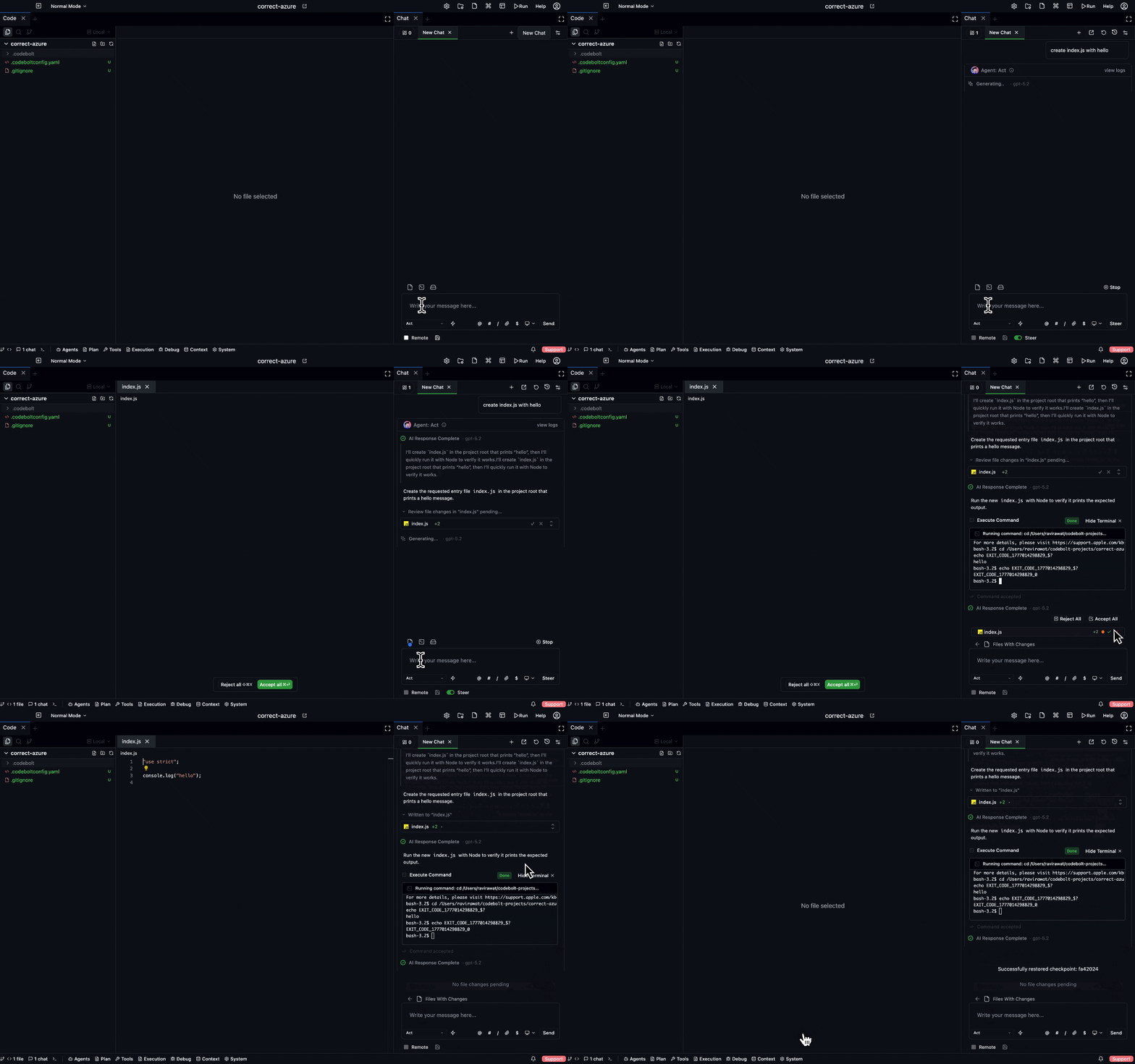
Codebolt saves a rollback-able snapshot at every meaningful step. You can undo any agent change, instantly, without touching your real git. This is what makes it safe to let agents run on real code.
How it works under the hood: shadow git + the event log. See Checkpoint and rollback (internals) for the full story. This page is the user's view.
What gets checkpointed
Automatically:
- Before any file write.
- At the start of every agent phase.
- After each successful tool call that changed state.
- At user-visible boundaries (you sent a message, the agent finished).
You can also create an explicit checkpoint with /checkpoint or Ctrl+S.
Each checkpoint captures:
- The state of every file in the workspace at that moment.
- The position in the event log.
- The agent phase and run ID.
- Any mutable memory state at that epoch.
Together, these let you go back exactly — not approximately — to any recorded moment.
The checkpoint strip
At the top of every chat tab you'll see a strip of checkpoints from this thread:
[● start] ─── [● turn 1] ─── [● turn 2] ─── [● turn 3: current]
- ● — a durable checkpoint.
- ○ — an implicit phase checkpoint (finer granularity, shown if you zoom in).
- current marker — where you are now.
Click any checkpoint to inspect, rollback, or branch from it.
Three things you can do with a checkpoint
- Desktop
- CLI
- Slash command
- HTTP API
Click any checkpoint dot in the strip → context menu offers Rollback, Replay (read-only), and Branch into new tab.
codebolt checkpoint list <thread-id>
codebolt checkpoint rollback <checkpoint-id>
codebolt checkpoint replay <checkpoint-id>     # opens read-only inspector
codebolt checkpoint branch <checkpoint-id> --new-thread
In the composer:
/rollback                    # to last checkpoint
/rollback <checkpoint-id>    # to a specific one
/checkpoint                  # create explicit checkpoint
POST /api/checkpoints/:id/rollback
POST /api/checkpoints/:id/replay
POST /api/checkpoints/:id/branch
Rollback
Restore the workspace to the state at that checkpoint. Every file reverts. Real git is untouched. The current thread is cut off at that point — turns after the checkpoint are marked as "rolled back" but not deleted.
[● start] ─── [● turn 1] ─── [● turn 2] ─── [× turn 3 (rolled back)]
                              ▲
                            now here
If you change your mind, rollback again to turn 3's checkpoint — the files come back, because shadow git still has them. Nothing is ever actually lost.
Replay (inspect)
Open a read-only view of the workspace as it was at that checkpoint. Files, diffs, open editor tabs, even the chat state — all as they were. You can scroll through without affecting anything live.
Good for: "what did the agent do, exactly?", "show me this file before the refactor", "did this test pass at step 5 or step 8?".
Branch
Start a new chat tab with this checkpoint as the starting state. Useful for exploration: "what if I asked the agent to do X from here instead?". The original thread keeps going; the branch is a parallel universe.
What rollback does and doesn't touch
| Touched | Not touched |
|---|---|
| Your workspace files | Your real .git/ directory |
| The chat thread (cut off at the checkpoint) | Prior checkpoints (all preserved) |
| Mutable memory epochs | Persistent memory (append-only — rollback doesn't erase history) |
| The event log (annotated, not rewritten) | Event log entries before the checkpoint |
| Open file tabs in the editor | Your real git stash or working tree state outside the workspace |
The event log is append-only. A rollback is itself an event; it never erases past events. This is the property that makes audit trustworthy: "we rolled back at 3pm" is recorded, not hidden.
Partial rollback
By default, rollback reverts every file in the workspace. But you can rollback just one file or one path:
- Right-click a file → rollback to checkpoint — this file only.
- Right-click a directory → rollback to checkpoint — subtree only.
/rollback src/auth/— path-scoped rollback.
Partial rollback leaves everything else where it is. Useful when the agent got 90% right and you just want to undo one bad file.
Checkpoints vs real git
These are different things. Don't confuse them.
| Checkpoints | Real git | |
|---|---|---|
| Created by | Codebolt automatically, on every step | You, when you run git commit |
| Visible to | You, in Codebolt | Everyone with access to the repo |
| Used for | Instant rewind during a work session | Durable history and collaboration |
| Lifetime | Scoped to the project; pruned eventually | Forever (until someone rebases) |
| Pushed anywhere | No | To remotes, as you direct |
Checkpoints are scratch history. Real git is permanent history. When an agent's work is ready, you commit it to real git yourself; checkpoints are irrelevant at that point.
Pruning
Checkpoints accumulate. By default, Codebolt keeps:
- Every explicit checkpoint forever.
- Automatic checkpoints for the last 30 days.
- Phase-level sub-checkpoints for the last 7 days.
- Older than that → pruned.
You can change this in Settings → Projects → Checkpoints. If you need to keep specific checkpoints forever, pin them with the 📌 icon — pinned checkpoints are never pruned.
Pruning only removes the sub-shadow-git commits; the event log entries are preserved (append-only).
When rollback is NOT enough
Rollback can undo file changes. It cannot undo:
- Emails sent. If an agent called
codebolt_mail.send, that email is gone into the world. - API calls with side effects. A webhook, a payment charge, a push to a remote.
- Changes outside the workspace. Edits to files outside the project folder, modifications to a running database, container state.
- Git push. If the agent pushed to a remote (it shouldn't, by default — guardrails block this), rollback doesn't unpush.
For anything with external side effects, guardrails are the mechanism, not rollback. The default policy blocks send/push/external-call actions without explicit approval.
Troubleshooting
"Rollback did nothing"
Usually means shadow git isn't initialised for this project. Check .codebolt/shadow-git/ — if missing, close and reopen the project; it'll be recreated.
"Files changed but no checkpoint was created"
Check the status bar — if the shadow git service is in an error state, writes aren't being captured. Restart the server.
"The chat says rolled back but the files didn't revert"
Rare. Indicates a mismatch between the checkpoint and the shadow git state. Settings → Projects → Repair rebuilds the checkpoint index from shadow git.
"I want to permanently delete something I rolled back from"
Rollback doesn't delete anything. To genuinely remove past states, use Settings → Projects → Prune checkpoints and confirm. This is irreversible.
See also
- Chat Overview
- Checkpoint and rollback (internals)
- Project & Workspace internals — where shadow git lives
- Guardrails — for things rollback can't fix