Context and @-mentions
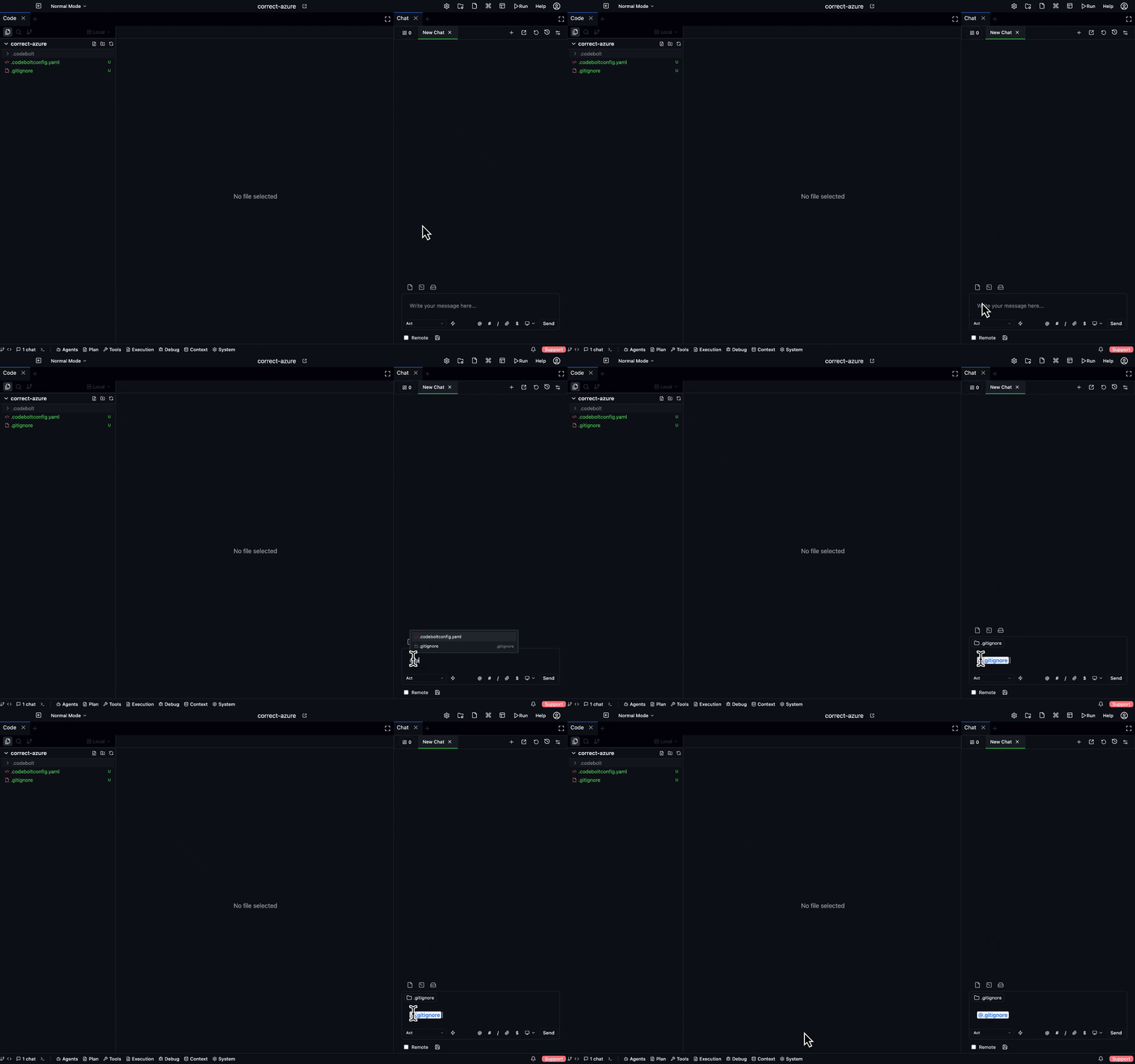
What the agent sees when you type a message isn't just the message — it's a carefully assembled prompt drawing from your project, recent turns, memory, and anything you explicitly pointed at with @. Understanding what's in the context is how you make agents behave better.
What's automatically in the context
Every turn, the context assembler pulls from a bunch of sources. The usual set:
| Source | What |
|---|---|
| System prompt | The agent's guiding prompt (fixed per agent) |
| Active rules | Matching context rules from the project |
| Recent history | The last N turns in this thread |
| Persistent memory | Workspace-wide facts filtered by the current task |
| Vector hits | Top-k semantically similar chunks from the codebase |
| Knowledge graph | Nearby entities to anything the task mentions |
| Codemap | Compressed architectural summary of the project |
| Environment | Current directory, git branch, time of day |
| Open files | Whatever's open in the editor |
| Your message | What you just typed |
All of this is budget-capped, merged, and sent to the LLM. You don't need to put things in the context manually — most of it gets there automatically.
When automatic isn't enough
Automatic context assembly is good, but it can miss things:
- A file the agent didn't know was relevant. Vector search and codemap may not surface it.
- A specific line or symbol you want attention on. The agent might read the whole file when you meant one function.
- Something outside the project — a URL, a doc, a paste.
- Past work — a specific earlier chat turn you want the agent to revisit.
For these, use @-mentions.
The @ menu
Typing @ in the composer opens a fuzzy picker. You can mention:
| Prefix | Picks | Example |
|---|---|---|
@ | Files in the project | @src/auth/session.ts |
@# | Symbols (functions, classes, exports) | @#getUser |
@: | Directories | @:src/auth/ |
@> | Terminal output | @>last (the last command output) |
@$ | Environment / status | @$git (current git status) |
@? | Chat turns | @?3 (the 3rd turn back) |
@! | External URLs | @!https://example.com/docs |
@~ | Memory entries | @~decisions (search persistent memory) |
Mentions render as chips in your message. The agent receives them as structured context entries, not just text — it knows which file each mention points at.
How mentions work under the hood
An @ mention becomes an explicit context item in the assembled prompt:
@src/auth/session.ts→ the full file content is injected into the prompt with a clear marker.@#getUser→ the symbol's definition + usages are injected.@:src/auth/→ a listing of the directory is injected.@!https://...→ the URL is fetched (if the browser tool is allowed) and the content injected.
Mentions take precedence over automatic context. If the budget is tight, automatic context is dropped before mentions are.
The context assembly pipeline resolves these mentions into structured context entries before passing them to the LLM. See Processors for how this works.
Viewing the assembled context
Click the "details" button on any turn (or /explain) to see what the agent actually received. You'll see:
- The full list of messages sent to the LLM.
- Which sources each piece came from.
- What was dropped or compressed to fit the budget.
- The tool schemas available.
This is the fastest way to understand why an agent did (or didn't) do something. "The agent ignored my instruction" is almost always "the instruction wasn't in the assembled context after compression".
Context rules
For things you always want in the context on specific topics, don't rely on mentions every turn — write a context rule:
# .codebolt/context-rules/auth.yaml
when:
  task_contains: [auth, login, session]
then:
  always_include:
    - path: docs/security-decisions.md
    - path: src/auth/README.md
  boost:
    - kg_entity: AuthService
      weight: 2.0
  exclude:
    - path: generated/**
This rule fires automatically every time the current task contains "auth", "login", or "session". It guarantees the security docs and the AuthService graph entries are always included for those tasks.
Rules live in .codebolt/context-rules/ and are project-local. See Context Assembly internals for the rule engine.
Budget and compression
Every LLM has a context window. Codebolt's assembler fits your prompt under a target budget (usually 60-80% of the model's max, to leave room for the response). If the assembled prompt is too big, it compresses in this order:
- Drop the lowest-relevance hits from each source (vector hits first, then KG, then persistent memory).
- Compress older turns — turns are summarised, with a marker in the stream.
- Summarise long tool outputs.
- Hard-truncate as a last resort, with an explicit
[... N tokens omitted ...]marker.
If compression happens, you'll see a subtle marker in the chat. You can turn compression off for a specific turn with /no-compact, but doing so just makes the next failure mode "prompt too large, turn rejected".
Long conversations
After ~20-30 turns in one thread, you'll usually see compression kick in. Three strategies for long conversations:
- Let compression do its work. For most threads this is fine.
/compact— explicitly compact the conversation and keep going. You'll lose fine detail but keep the narrative.- Start a new tab — copy the important decisions into a memory note, start fresh. Cleanest for a long-running project.
Agents also have a LoopDetectionModifier that catches repetitive behaviour, so a compressed thread usually degrades gracefully rather than suddenly.
What NOT to put in context
Some things look tempting but hurt more than they help:
- Whole directories when you only need one file. Budget bloat, lower relevance.
- Every file you've edited today. The assembler is already tracking recent edits.
- Long copy-pastes of output when you could point at the command with
@>last. - Your entire project readme when you could point at specific sections.
- Sensitive data the LLM shouldn't see. Use a redacting hook at the workspace level instead of relying on memory.