Memory Ingestion
Memory ingestion is the write path — how information gets captured, processed, and stored so that persistent memory pipelines can retrieve it later. Ingestion is event-driven: a trigger fires, raw data passes through a sequence of processors, and routing rules direct the output to one or more storage backends.
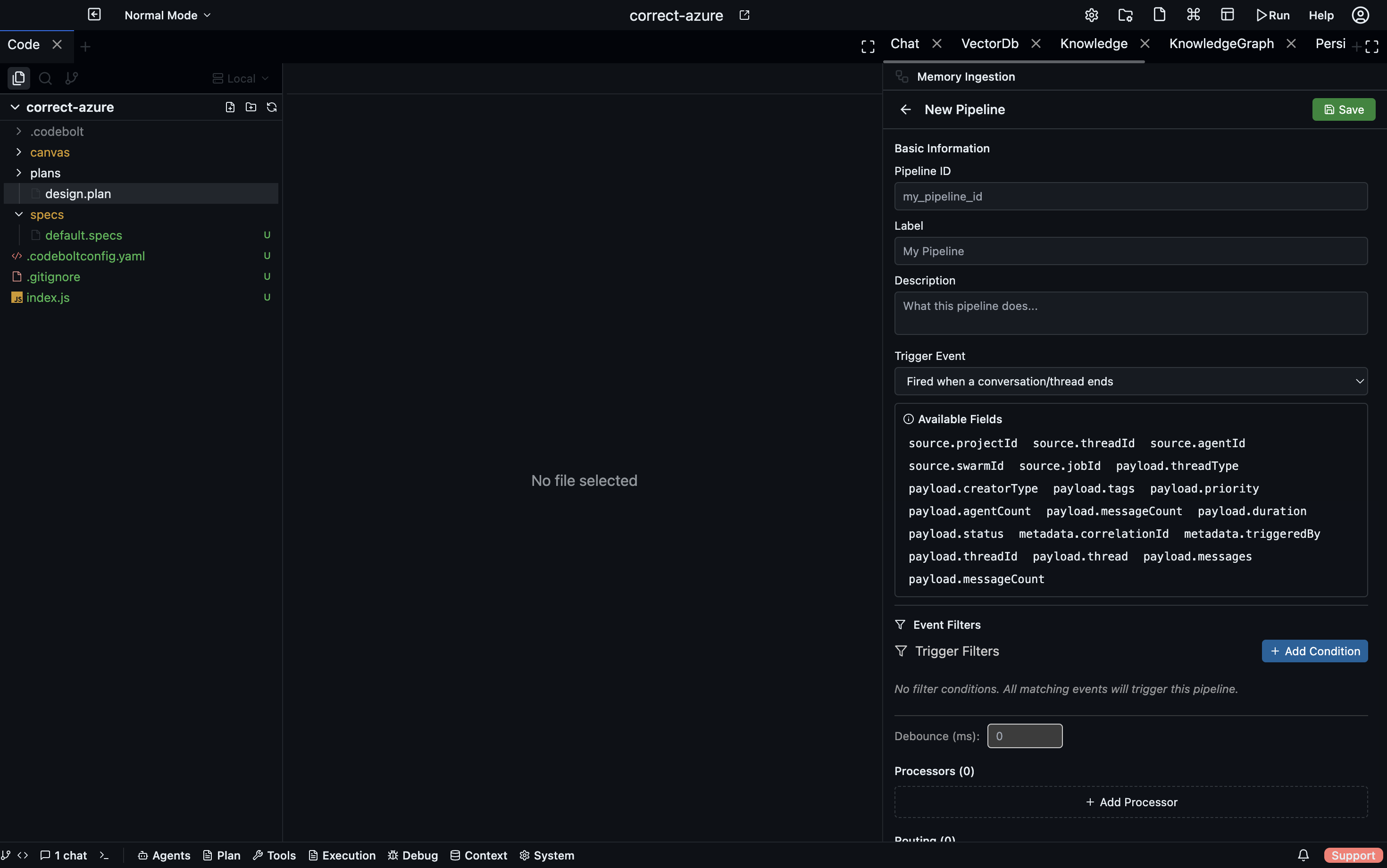
Configuration lives in .codebolt/MemoryIngestion/. Each file defines one ingestion pipeline.
Triggers
A trigger determines when the pipeline runs.
| Trigger | Fires when… |
|---|---|
onConversationEnd | The agent's current conversation completes normally |
onTaskCompleted | A task transitions to the completed state |
onTaskFailure | A task fails or times out |
onAction | A tool call or significant action is logged to the event log |
manual | An agent or developer calls the ingestion API directly |
Multiple triggers can activate the same pipeline. A common pattern is onConversationEnd + onTaskCompleted so the pipeline runs at both natural endpoints:
name: conversation-summary-ingestion
triggers:
  - onConversationEnd
  - onTaskCompleted
Processors
Once triggered, the raw payload passes through processors in sequence. Each processor transforms or annotates the data before passing it to the next.
chunker
Splits large text into overlapping chunks of a configurable token size.
- processor: chunker
  chunkSize: 512        # tokens per chunk
  overlap: 64           # tokens of overlap between consecutive chunks
  splitOn: paragraph    # paragraph | sentence | token
Chunking is almost always the first processor when the input is free-form text, because vector embeddings and graph extraction work best on focused, bounded passages.
normalizer
Cleans and standardises text before further processing.
- processor: normalizer
  trim: true
  deduplicateWhitespace: true
  redactPII: true       # removes emails, phone numbers, etc.
  encoding: utf-8
Run normalizer before vector_embed or llm_extract to avoid noisy embeddings or confused extraction.
parser
Parses structured input formats into normalised records.
- processor: parser
  format: code          # code | json | markdown | csv
  language: typescript  # for code: the programming language
When parsing code, the output is an AST-derived list of symbols, imports, and definitions rather than raw text — better input for graph extraction.
vector_embed
Embeds each chunk and writes the embeddings to the vector store.
- processor: vector_embed
  index: conversation-history    # named index to write to
  model: default                 # embedding model (default | fast | large)
  metadata:
    source: "{{trigger.conversationId}}"
    date: "{{now}}"
The metadata block attaches structured fields to each embedding. These fields are available in filter steps during retrieval.
llm_extract
Calls the LLM to extract structured entities and relationships from each chunk, then writes the result to the knowledge graph.
- processor: llm_extract
  schema:
    entities:
      - type: Function
        fields: [name, signature, description]
      - type: Module
        fields: [name, path]
    relationships:
      - type: CALLS
        from: Function
        to: Function
The schema tells the LLM what to look for. Extracted entities become nodes in the Kuzu graph; relationships become edges.
custom
An arbitrary TypeScript function registered via the codeboltjs SDK. Receives the full pipeline context and can read from or write to any store.
// .codebolt/MemoryIngestion/processors/my-processor.ts
import { codebolt } from '@codebolt/sdk';

export default async function myProcessor(context: IngestionContext) {
  const summary = await codebolt.llm.complete(`Summarise in one sentence: ${context.text}`);
  await codebolt.memory.kv.set(`last-summary-${context.sessionId}`, summary);
  return context; // pass data to next processor unchanged
}
Register the processor in your pipeline definition:
- processor: custom
  handler: ./processors/my-processor
Routing rules
After all processors have run, routing rules decide where to write the results.
A routing rule is a foreach · condition · write_to triple:
routes:
  - foreach: chunk          # item | chunk | entity | relationship
    condition: "score > 0.6"
    write_to: vector://conversation-history

  - foreach: entity
    condition: "entity.type == 'Function'"
    write_to: graph://
foreach— iterates over items in the processor output (whole input, individual chunks, extracted entities, etc.)condition— a predicate; only items that satisfy it are writtenwrite_to— a destination URI; template variables are resolved at runtime
One pipeline run can route to multiple destinations in parallel.
Destinations
| URI scheme | Storage backend |
|---|---|
vector://index-name | Vector store — semantic search |
graph:// | Kuzu knowledge graph — entity/relationship queries |
kv://key-name | KV store — fast key lookup |
log:// | Append-only event log |
blob://path | Raw file storage |
A complete example
name: task-completion-ingestion
description: When a task completes, embed the conversation and extract code entities
triggers:
  - onTaskCompleted
pipeline:
  - processor: chunker
    chunkSize: 400
    overlap: 50
    splitOn: paragraph
  - processor: normalizer
    trim: true
    redactPII: false
  - processor: vector_embed
    index: task-history
    metadata:
      taskId: "{{trigger.taskId}}"
      completedAt: "{{now}}"
  - processor: llm_extract
    schema:
      entities:
        - type: Function
          fields: [name, description]
        - type: File
          fields: [path]
      relationships:
        - type: MODIFIED
          from: Function
          to: File
routes:
  - foreach: chunk
    write_to: vector://task-history
  - foreach: entity
    write_to: graph://
  - foreach: relationship
    write_to: graph://
Running ingestion manually
Trigger a pipeline from the CLI without waiting for a lifecycle event:
codebolt memory ingest task-completion-ingestion --input "path/to/conversation.txt"
Useful for backfilling existing notes, importing external knowledge, or testing a new pipeline before relying on it in production.
Monitoring ingestion
The Codebolt UI shows an ingestion log under Memory → Ingestion history:
- which pipelines ran and when
- how many chunks/entities were produced
- how many tokens were written to each destination
- any processor errors
See also
- Memory layers — details on each storage backend
- Persistent memory — how to retrieve what ingestion writes
- Context assembly — how retrieved data becomes the LLM context