The Agent Marketplace
A public catalog of agents, tools, and capabilities that anyone can install into their Codebolt. Think of it as a package registry — npm or PyPI, but for AI agents.
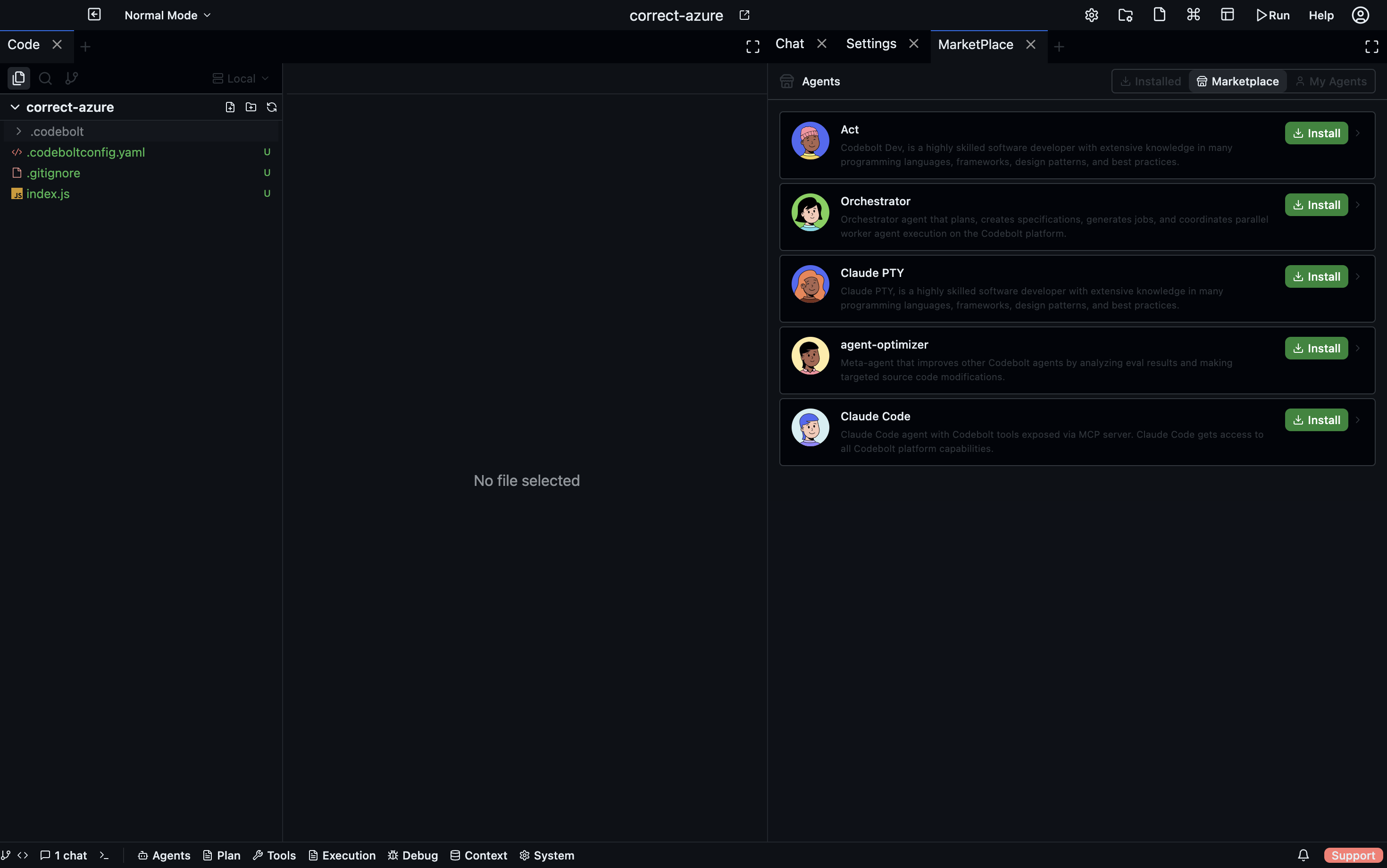
What's on the marketplace
Three kinds of things:
| Kind | What | Examples |
|---|---|---|
| Agents | Custom agents ready to run | Code reviewers, language-specific specialists, test generators |
| Tools / MCP servers | New capabilities agents can call | Linters, internal API clients, database tools |
| Capabilities | Bundles combining agents + tools + prompts + UI | Full integrations like "Stripe", "Supabase", "Linear" |
All three install through the same UI. From your point of view, installing an agent and installing an MCP server look the same.
Browsing
- Desktop
- CLI
- TUI
- HTTP API
Settings → Marketplace opens the browser. Search box, filter sidebar, sort dropdown.
codebolt marketplace search <query>
codebolt marketplace search <query> --kind agent --language typescript
codebolt marketplace show <name>           # full details
codebolt marketplace top --kind agent      # most popular
m opens the marketplace pane. Tab switches between Agents / Tools / Capabilities. / to search, ↑/↓ to navigate, Enter for detail.
GET /api/marketplace/search?q=reviewer&kind=agent
GET /api/marketplace/items/:name
You can:
- Search by name, tag, or description.
- Filter by kind (agents / tools / capabilities), language, category.
- Sort by popularity, rating, recently updated, newest.
Each entry shows:
- Name, description, author, version.
- Install count and rating.
- Categories and tags.
- Screenshots and a README.
- The full manifest — tools it needs, limits, required providers.
- Changelog and version history.
Read the README before installing. It should tell you what the agent is for, what tools it needs, what its blast radius is (read-only? write-capable? shell access?).
Installing
For the install action across surfaces, see Installing an agent. The summary:
Under the hood, regardless of surface:
- The marketplace manifest is downloaded.
- The server checks compatibility (protocol version, required MCP servers, required capabilities).
- If dependencies are needed, you're prompted to install them too.
- The agent is added to your portfolio and appears in the agent picker.
Installation is per-workspace by default. You can promote an agent to user-wide from Settings → Agents → Promote to user scope or codebolt agent promote <name> --user.
Trust model
Marketplace entries go through automated review:
- Lint check — manifest is valid, required fields present.
- Security scan — no obvious secret leakage, no known-bad dependencies.
- Basic behaviour check — the agent loads and can handle a trivial task.
This catches obvious problems. It does not catch:
- Malicious intent disguised as normal behaviour.
- Subtle security issues (prompt injection vulnerabilities, privilege escalation via tool chains).
- Quality issues (agent is slow, prompts are bad, memory usage is wasteful).
Treat marketplace agents like third-party libraries. Read the manifest. Check the author's track record. Look at the tool allowlist — if an unfamiliar agent wants codebolt_fs.write_file + codebolt_git.push, think carefully before installing.
Portfolios
Your workspace has an agent portfolio — the curated set of agents actually available in that workspace. Installing doesn't automatically add to the portfolio; you add explicitly. This lets you install several agents to try, decide which are keepers, and remove the rest without them cluttering your picker.
Settings → Agents → Portfolio shows:
- Installed agents.
- Which are active in this workspace (in the portfolio).
- A ranking of agents by reputation score (if enabled — see Stigmergy and Reputation).
Teams that self-host often constrain what the portfolio can contain: "only approved agents from our internal registry". See Self-hosting.
Updating
Marketplace agents publish versions. Your installed copy is pinned to whatever version you installed.
- Check for updates — Settings → Agents → Check updates.
- Update one — pick the new version in the details panel.
- Update all — bulk update; skips any with breaking major-version changes.
Major version updates are never automatic. A breaking change (different inputs, different tool allowlist, different semantics) requires an explicit decision on your part.
Deprecated versions are still available but marked — you'll see a warning if you're running one.
Publishing your own
Anyone can publish. See Build on Codebolt → Publishing for the full workflow.
Quick version:
codebolt agent lint my-agent
codebolt agent test-all my-agent
codebolt agent publish my-agent
The first publish of a name reserves it. Subsequent publishes must be from the same account.
Private registries
Organizations can host their own marketplace. A private registry:
- Has its own namespace (e.g.
my-org/my-agent). - Uses your company's auth.
- Supports reviewing agents before they become available.
- Can mirror approved public marketplace entries.
Configure a private registry in Settings → Registries. Private registries take precedence over the public marketplace for the same name. See Self-hosting → Registries.
Removing
codebolt agent uninstall <name>
Or in the UI: Settings → Agents → Uninstall.
Uninstalling removes the agent from the portfolio and deletes its files. It does not delete:
- Historical runs from that agent (still queryable via event log).
- Memory the agent wrote (persistent memory, knowledge graph entries).
- Checkpoints taken during its runs.
To purge everything, use Settings → Agents → Purge data — irreversible.