Language Servers
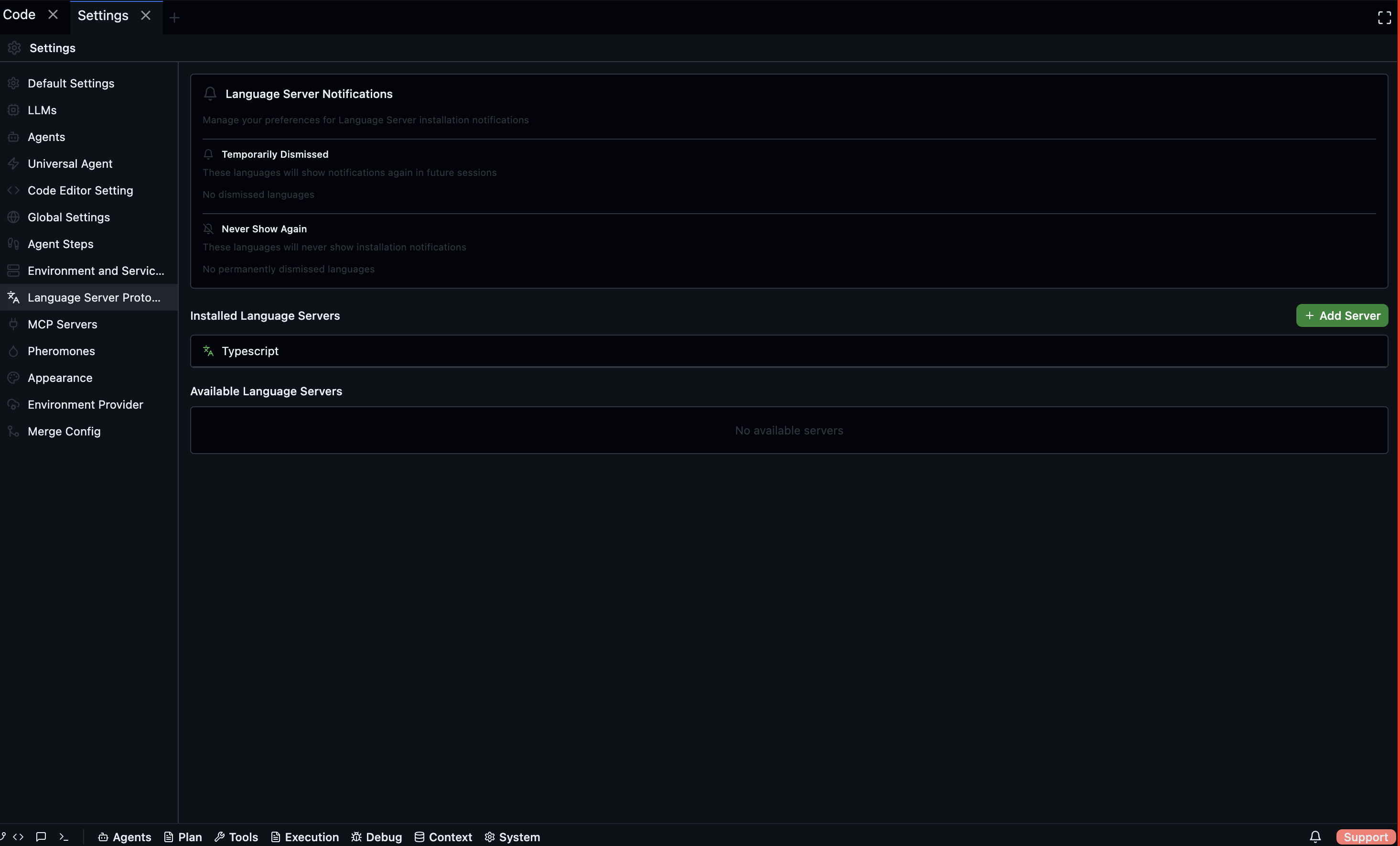
Language Server Protocol (LSP) servers provide code intelligence — completions, diagnostics, go-to-definition, and inline error highlighting — for specific languages inside the Codebolt code editor.
Open via: Settings → Language Server Protocol
Installed servers
Lists all language servers currently registered with Codebolt. Each entry shows the server name and its status. Click an entry to open its configuration.
Available servers
Lists language servers that are ready to install. Click the Install button (download icon) next to a server to install it. Installation status updates in real time.
Adding a custom server
Click Add Server to register a language server manually:
| Field | Description |
|---|---|
| Server Name | Display name for the server |
| Command | Executable path or shell command to start the server |
| Install Command | Command to install the server (e.g. npm install -g ...) |
| Arguments | Comma-separated arguments passed to the start command |
Click Add Server to register. The server appears in the Installed list.
Notification preferences
When Codebolt detects a file type that has a matching language server not yet installed, it shows a notification prompt. You can dismiss these permanently or temporarily.
| Category | Description |
|---|---|
| Temporarily Dismissed | Notification suppressed for the session; will reappear later |
| Never Show Again | Notification permanently suppressed for that language |
Click the × next to any language to remove its dismissal entry. Click Reset All Preferences to restore all suppressed notifications.